Circuit Builder
From an RC circuit idea to a plan you can build.
- My role
- Product design & development
- Project context
- Live product · Ongoing development
The problem
A layout has to work off screen.
Planning a physical RC circuit means connecting geometry, space, scale, and construction. I wanted those constraints to guide the design from the start, rather than become problems when someone begins building.
My contribution
I designed and built the product, working across the editor, 3D preview, and printing workflow. My own interest in RC circuits gave me a starting point for exploring how digital planning could connect with a real-world build.
The organizing idea
Draw, Drive, and Build are connected workspaces around the same circuit. Each supports a different part of the task without asking people to maintain separate versions of their plan.
01 / draw
Bring real constraints into the drawing.
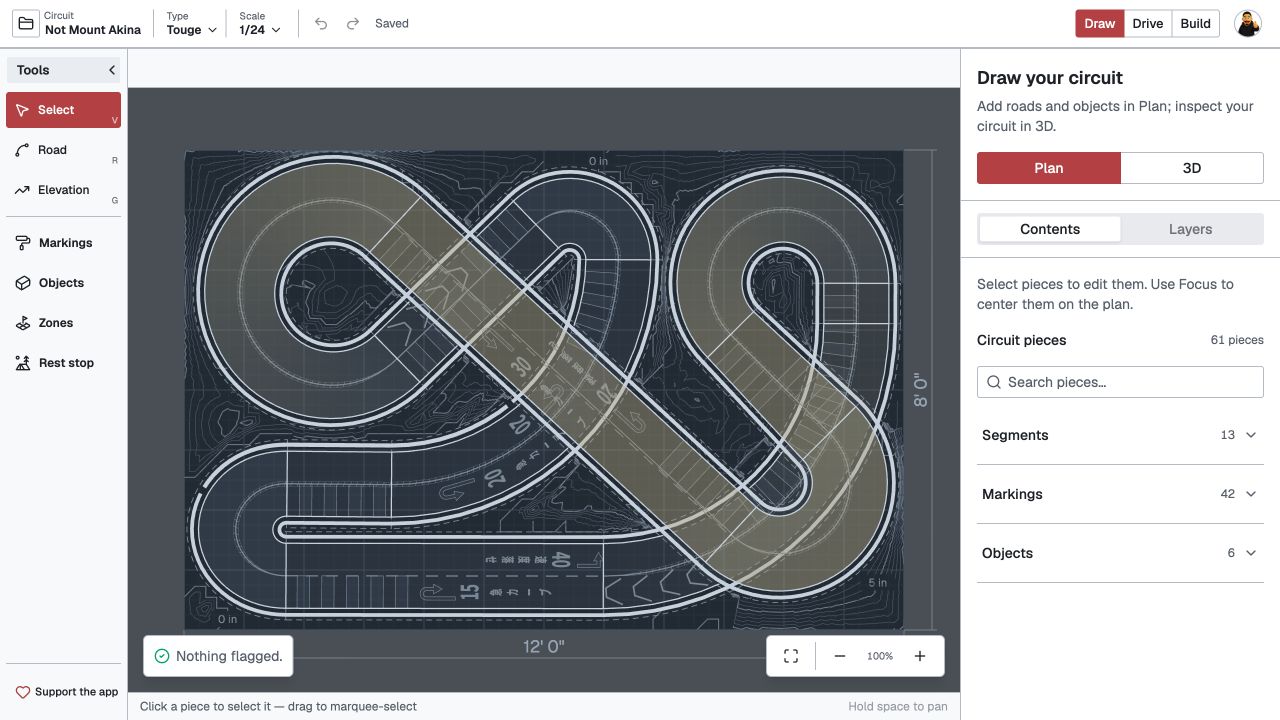
An RC circuit has to fit the available space and the scale of the cars. I brought those constraints into the Draw workspace: a boundary, scale-aware guidance, connected road pieces, and checks for tight corners, narrow lanes, and steep ramps.
02 / Preview
Inspect the same layout beyond the flat plan.
A flat drawing doesn’t make elevation and transitions easy to understand. The 3D view uses the same layout, while Drive adds a simulated line and chase-camera view. These previews help people inspect their plan; real handling still depends on the car, setup, and surface.

03 / build
Turn the digital plan into something buildable.
The Build workspace connects the plan to numbered pieces, full-size templates, and assembly progress. Calibration bars and a trial piece let people check a printed dimension before committing to the whole circuit. A separate report records the plan reference and design estimates.

Reflection
Designing the journey—and carrying it through.
Working across scales and spaces
The product includes guidance for ten RC scales, boundary checks, adjustable widths, offline editing, sync, and private-by-default circuits. Those decisions support planning across devices and between home and the club.
What this work demonstrates
Circuit Builder shows how I connect product structure, detailed interaction design, and implementation. It is a working product that I continue to develop, rather than a concept presented as a shipped result.
Let’s talk about
your next design hire.
I’m exploring Product Designer opportunities. Tell me about your team and the problems you’re working on.